






Screens can be more than a source of passive entertainment. When paired with hands-on materials, digital tools can help people plan projects, learn new skills, capture ideas, and share finished work. The result is a creative hobby that combines the convenience of technology with the satisfaction of making something real.
Whether you enjoy drawing, building, cooking, music, or photography, there are many ways to create a balanced activity. Here are several hobbies that bring screen time and hands-on work together.
Digital Drawing and Traditional Art
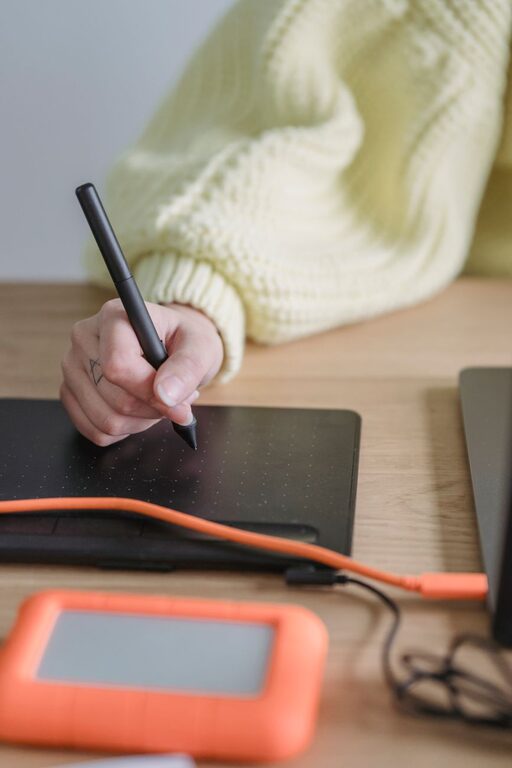
Digital drawing apps can support traditional art without replacing it. You might use a tablet to sketch an idea, study color combinations, or find inspiration before moving to paper, canvas, or another physical surface.
A simple project could begin with a digital sketch. After refining the shape and layout, you can print it as a reference and recreate it with pencils, markers, watercolor, or paint.
Ideas to try
– Create a digital color palette, then use it in a painting.
– Draw a design on a tablet and turn it into a greeting card.
– Use a photo as a reference for a pencil sketch.
– Scan a finished drawing and add a digital background.
– Make a series of illustrations around one theme.
This hobby works well for beginners because digital tools make it easy to experiment. You can test different colors and layouts before using physical supplies.
Photography and Photo Crafting
Photography naturally combines screen time with activity outside the device. Taking photographs encourages you to explore your surroundings, notice details, and look for interesting light, texture, and color. Afterward, editing the images gives you a chance to shape the final result.
The hands-on side can continue after editing. Printed photographs can become scrapbook pages, wall art, postcards, or handmade gifts.
Project ideas
– Photograph a local park or neighborhood and create a themed album.
– Print favorite images for a scrapbook.
– Make a collage from travel or family photographs.
– Create a small photo book using an online design tool.
– Take close-up images of everyday objects and turn them into art prints.
You do not need expensive equipment. A phone camera, simple editing app, and access to a printer can provide everything needed for many projects.
Digital Design and Paper Crafts
Graphic design tools are useful for making physical paper projects. You can create invitations, labels, bookmarks, calendars, gift tags, and decorations on a computer or tablet, then print and assemble them by hand.
This hobby is especially enjoyable for people who like both visual design and practical crafting. You can adjust the digital layout as often as needed before cutting, folding, gluing, or decorating the final piece.
A beginner project
Try designing a set of personalized bookmarks:
- Choose a simple shape and size.
- Add colors, patterns, or a short message.
- Print the design on sturdy paper.
- Cut out the bookmarks.
- Add ribbon, stickers, or a protective covering.
The project is small enough to finish in one sitting, but it also introduces useful skills such as spacing, color selection, and careful cutting.
3D Printing and Model Making
Three-dimensional printing connects digital planning with physical construction. A computer program is used to create or adjust a design, while the printer produces a tangible object. You can then sand, paint, assemble, or customize the printed pieces.
For those without a 3D printer, many community workshops, libraries, and maker spaces offer access to one. You can also explore 3D modeling as a digital hobby and later build designs with cardboard, foam board, clay, or wooden parts.
Things to make
– Small storage containers
– Desk organizers
– Decorative shapes
– Game pieces
– Plant markers
– Simple replacement parts for household projects
Start with a basic design rather than a complex model. Learning how shapes fit together is more important than creating a detailed object right away.
Video Making With Practical Projects
Video creation can encourage hands-on activity when the subject is something you are already making. Cooking, woodworking, gardening, painting, and model building can all become the focus of a short video.
The screen is used for planning, filming, editing, and sharing. The main activity still happens away from the device.
How to begin
– Choose one small project.
– Write a short list of steps.
– Record brief clips as you work.
– Add simple titles or captions.
– Keep the finished video short and clear.
You do not need to appear on camera. A hands-only view, time-lapse, or photo slideshow can tell the story just as effectively. Creating videos can also help you notice which steps are easiest to explain and which parts of a process need improvement.
Music Production and Instrument Practice
Music apps can make hands-on instrument practice more engaging. A digital metronome can help with timing, while recording software lets you listen to your playing and track creative ideas.
You can combine an instrument with simple digital production by recording a guitar, keyboard, hand drum, or homemade percussion instrument. Even clapping, tapping, or found household sounds can become part of a rhythm project.
Try these activities
– Record a short melody and add a beat.
– Create a rhythm using objects such as boxes or jars.
– Practice along with a digital metronome.
– Layer several simple sounds into one track.
– Design a handmade instrument and record its sound.
The goal does not have to be a polished song. Experimenting with sound is a creative way to move between focused screen use and active practice.
Cooking With Digital Planning
Recipes, tutorials, and meal-planning apps can support hands-on cooking. The screen helps you learn a technique or organize ingredients, while the main activity involves preparing, mixing, shaping, and tasting food.
To make the experience more creative, choose a familiar recipe and add your own variation. You might change the presentation, create a new flavor combination, or prepare a themed snack board.
Make the process more hands-on
– Write or print the recipe before you begin.
– Measure ingredients in advance.
– Photograph each stage of the project.
– Design a menu card for the finished meal.
– Keep notes about what you would change next time.
Cooking projects can also become a family or group activity, with one person handling the digital instructions and others preparing the ingredients.
Building and Crafting With Online Guides
Online tutorials can introduce you to hobbies such as knitting, sewing, woodworking, paper folding, and miniature building. The key is to use the screen as a guide, then spend most of the time practicing with real materials.
Choose tutorials that explain each step clearly and match your experience level. Pause the video when needed, take notes, and keep supplies organized so you are not constantly switching between the screen and your project.
Creating a Balanced Routine
Screen-based creative hobbies work best when the digital and physical parts support each other. Set a clear purpose for your screen time, such as researching a technique, designing a pattern, or editing a project. Then move into the hands-on stage.
A few simple habits can help:
– Prepare materials before opening an app or tutorial.
– Use a stand so your device stays nearby but out of the way.
– Take regular breaks to stretch and look away from the screen.
– Save finished projects in a physical folder or display area.
– Focus on learning and experimenting rather than perfection.
The most rewarding creative hobbies are often those that let you move between ideas and action. By combining digital tools with hands-on work, you can learn at your own pace while producing something you can hold, use, display, or share.